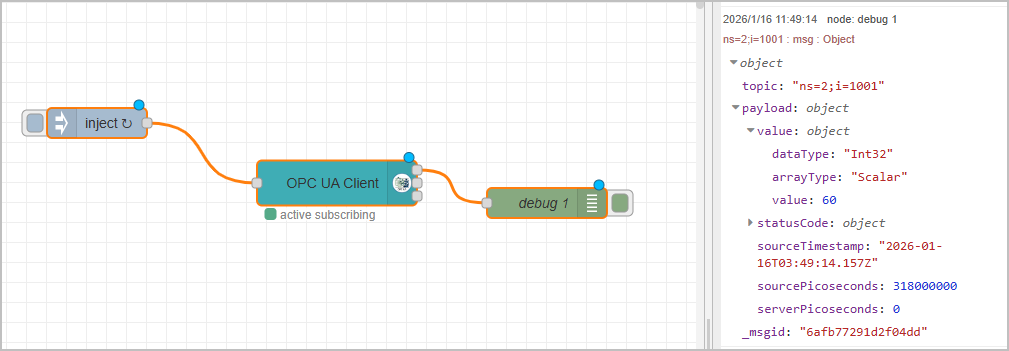
Connecting OPC UA
Read Data from OPC UA Server
- In Source Flow, drag an inject node.
- Double-click the node, and then enter the NodeId from your OPC UA server.

- Drag an OpcUa-Client node, and then double-click it.
- Click
 next to Endpoint to enter the information of your OPC UA server.

- Click Add, and set Action to READ.
- Leave everything else as default, and then click Done.

- Connect the inject node to the OpcUa-Client node, and then connect a debug node at the end.
- Click Deploy at the upper-right corner, and then click inject node to trigger the flow.

Subscribing Data from OPC UA Server
- In Source Flow, drag an inject node.
- Double-click the node, and then enter the NodeId from your OPC UA server.
- msg.payload:
[
    {
        "nodeId": "ns=2;i=1001",
        "datatype": "Int32"
    },
    {
        "nodeId": "ns=2;i=1002",
        "datatype": "Int32"
    }
]
- msg.topic: multiple
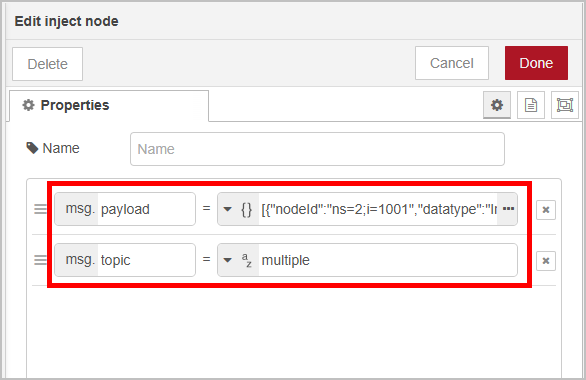
- Drag an OpcUa-Client node, and then double-click it.
- Click next to Endpoint to enter the information of your OPC UA server.
- Click Add, and set Action to SUBSCRIBE.
- Set the subscription interval, and leave everything else as default, and then click Done.
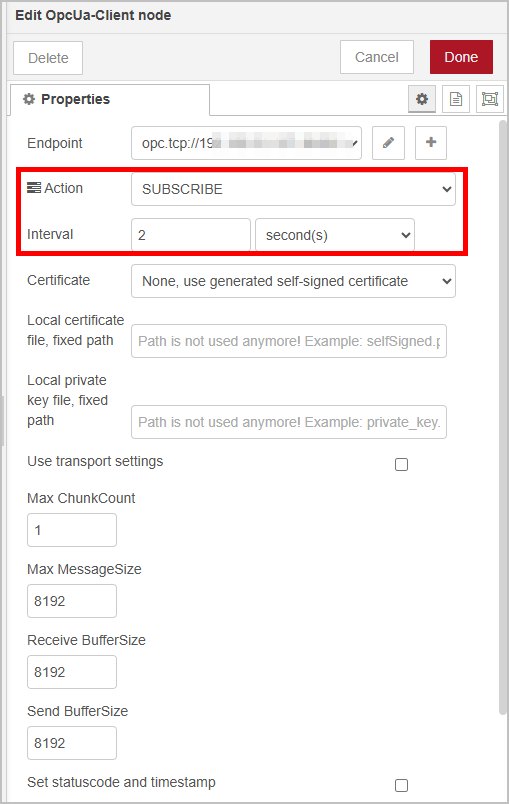
- Connect the inject node to the OpcUa-Client node, and then connect a debug node at the end.
- Click Deploy at the upper-right corner, and then click inject node to trigger the flow.