Connecting File
info
Before processing files in Source Flow, you need to put the file in to the corresponding docker.
scp C:\Users\you\Desktop\myfile.txt username@server IP:/home/username/
 //copy the file from local to server
docker cp /root/config.json <docker name or ID>:/app/config.json
 //copy the file from server to docker
general docker commands
| Command | Description |
|---|---|
docker ps | Lists all running Docker containers. |
docker ps | grep [container] | Filters running containers based on the specified docker information. |
docker exec -it [container] /bin/sh | Starts a shell session inside a running container using /bin/sh. |
mkdir [directory] | Creates a new directory with the specified name inside a container. |
Connecting a Text File
- In Source Flow, drag an inject node.
- Drag a read file node, and then double-click it.
- Enter the file path and output configuration.

- Click Done, and then connect a debug node at the end.
- Click Deploy at the upper-right corner, and then click inject node to trigger the flow.

Connecting an Excel File
- In Source Flow, drag an inject node.
- Drag a read file node, and then double-click it.
- Enter the file path and output configuration.

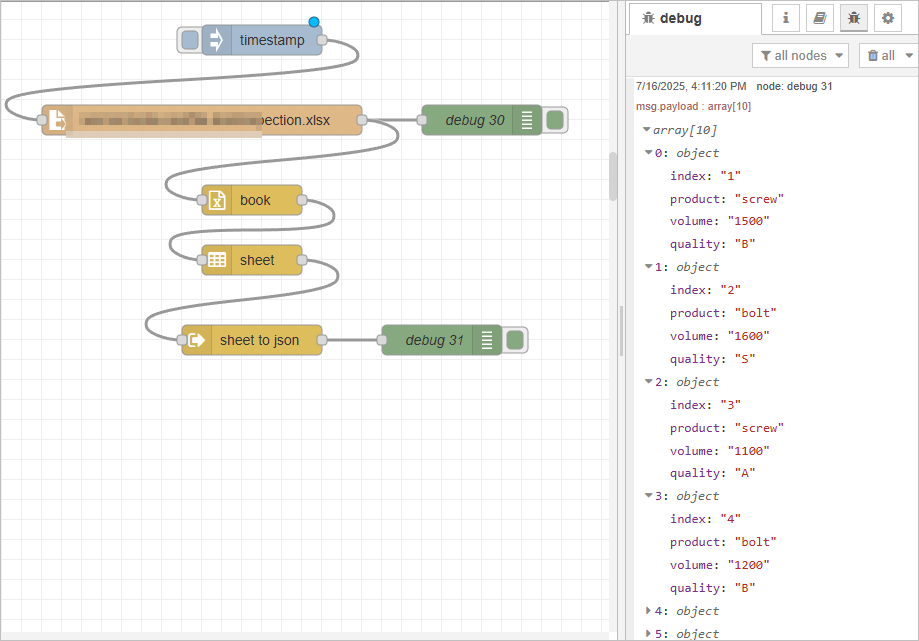
- Click Done, and then connect a book, a sheet and a sheet to json node by order to convert table data to json.

- Click Deploy at the upper-right corner, and then click inject node to trigger the flow.